Showing posts with label Blogger in General. Show all posts

Thursday, January 28, 2016

Are You Having Problems Finding Your Favorite Blogs?


Are you having problems accessing your favorite blogs? If so, you can thank Google! I have noticed this week a significant decrease in my followers but I wasn't sure what the problem might be. I am not exactly a computer wizard. Then this morning my fellow blogger, Jana Iverson Last posted on Facebook that she had noticed the same issue. She also provided the link to an article that had been posted by Blogger back in December 2015.

In  2011, Google announced that they would be retiring Google Friend Connect. In December of 2015 they posted an update on this plan. The post comes from Michael Goddart, Software Engineer and you can find his post here.

In a nut shell here is what the post from Mr. Goddard said, over the next few weeks Google will be making changes (in an effort to streamline) which will require readers of our blogs to have a Google account in order to use their Google Friend Connect service to follow any blogs using the Blogger platform.

In Mr. Goddard's press release he said, "...we'll remove the ability for people with Twitter, Yahoo, Orkut or other Openld providers to sign in to Google Friend Connect and follow blogs. At the same time we'll remove non-Google Account profiles so may see a decrease in your blog follower account."
What does this mean for my readers? It's a simple fix and easy to do. If you don't already have an account with Google, you will need to create one. To create a Google account go to this link and create your Google account. If you already subscribe by email you should be fine.

Photo Credit: (http://www.bing.com/images/search?q=Looking+through+Magnifying+Glass+Cartoon&view=detailv2&qft=+filterui%3alicense-L2_L3_L4_L5_L6_L7&id=ABB3375D92299522B39F8B6530252ED9D9377BAD&selectedIndex=0&ccid=IA2czQlC&simid=608048373621589470&thid=OIP.M200d9ccd0942043f90cb39abae57fdd3o0&ajaxhist=0 : downloaded 28 January 2016)

Tuesday, December 29, 2015

I Added Stat Counter to My Blogs

I love Blogger and find it very easy to use but I have not been very happy with the statistics provided by Blogger because it doesn't really breakdown the month status of hits. I did a Google search and found StatCounter for Blogger/Blogspot. From what I can tell, the company provides hit tracking and visitor tracking which Blogger does but they also provide web analytics and website statistics. Below is an example from their website.

 An example of the type of stats from StatCounter (https://statcounter.com/free-web-stats/).

They also provided a video of the instructions as well as step by step guide with pictures on how to add this to your blog. I used the step by step instructions rather than the video. You will need to register with a user name and password. Once you have done this you will need to "add a project". I used the name of my blog (Dawning Genealogy) and the website for my blog (dawninggenealogy.blogspot.com) for the project information. Then you be asked which platform and there many listed. Click on Blogger/Blogspot. You will be lead to the step by step instructions and video. 

There are 20 steps to follow and there is also a "check your installation" button so that you know whether or not you have done it correctly. Since the process is has 20 steps I won't bore you with each and every step. It took me maybe 10 minutes to set up both of my blogs and in the time I have taken to write this post I have had 38 hits at Dawning Genealogy. I have made a note on my calendar to post a followup in 30 days.


Here is what my stats look like since I added this my blog.

Sources: 

StatCounter, (http://statcounter.com : 29 December 2015) 


Thursday, December 17, 2015

A New Tool From Blogger - Featured Post

This morning when I signed into Blogger, there was a post about new feature, highlighting your posts. Now according to the date it was originally published on December 10th, 2015. If you already know how to do this I apologize because I am still learning.

I decided to give it a try. Here are the step by step instructions:
  • Go to your Layout tab,
  • Select add a gadget
  • Select "Featured Post"
  • Scroll down to the bottom and save.
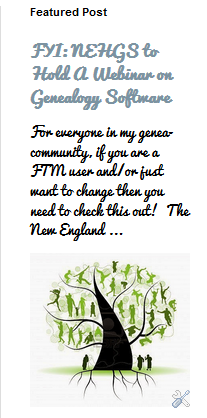
You can change the post anytime you want to. Here is a screen shot of the post I choose to see what it would look like.


Sources:


File: Blogger.svg, Wikimedia Commons. Author: ZyMOS. January 2010. (https://commons.wikimedia.org/wiki/File:Blogger.svg : 17 December 2015).

Ronen, Guy, "Highlight the Posts That Matter the Most", Blogger Buzz (http://buzz.blogger.com/2015/12/highlight-posts-that-matter-most.html : 17 December 2015).